

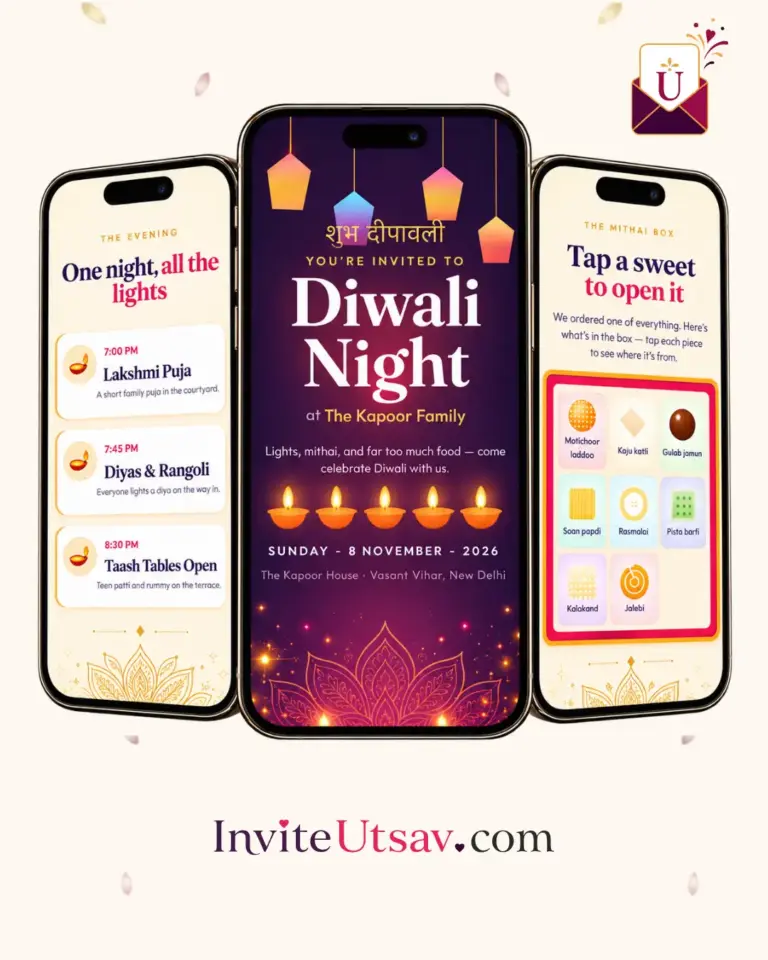
Diwali
Diwali — Light
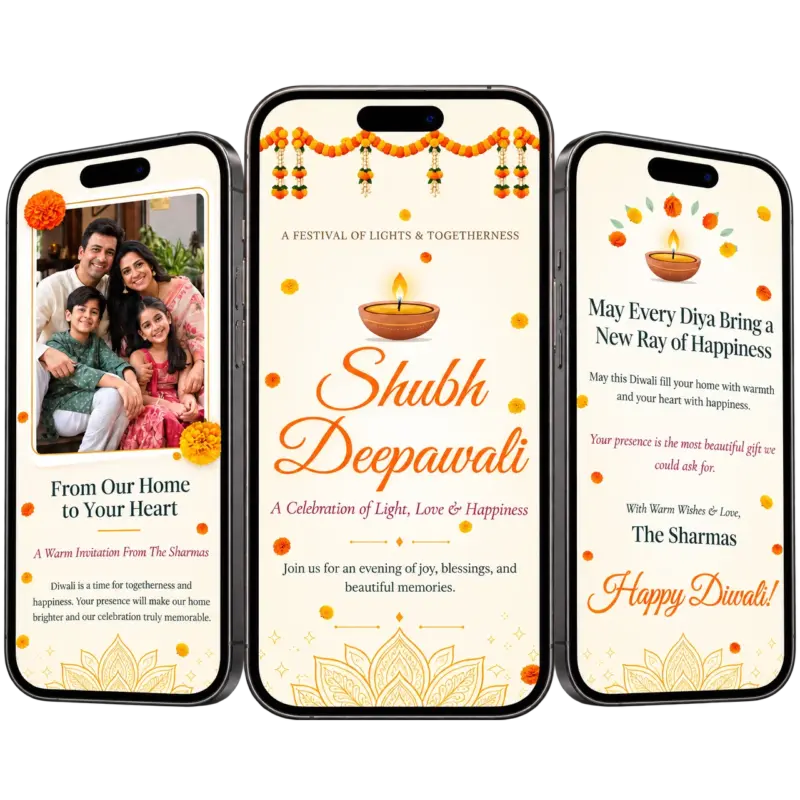
Diwali Light opens with a lit diya and a soft pastel welcome, introduces your family with a personal message and photo, lists your evening schedule and venue, and invites guests to RSVP — in ivory, peach and sage with real marigolds drifting across the page.
Starting
₹1,499
₹1,999
(25% OFF)
- PhotosUnlimited
- EventsUnlimited
- Go LiveInstant Go Live
Design Highlights
Why Couples Choose Diwali — Light
Lit Diya and Drifting Marigolds
A glowing diya opens the invitation while real marigold petals drift gently across the page.
Family Invitation With Photo
Introduce your family with a personal message and a portrait, in your own words.
Evening Schedule
List each part of the evening with a time, a title and a short description.
Venue With Get Directions
Show the venue and let guests open directions in one tap.
RSVP by Form, Call or WhatsApp
Guests reply on the page, or call or message you on WhatsApp.
Festival Music With Play and Pause
A gentle festival track plays when the invitation opens, with a button to pause it.
You May Also Like
Related Diwali Designs
Story Behind Diwali — Light Design
Diwali Light is a soft, pastel Diwali invitation website that opens with a lit diya, drifts real marigold petals down the page and then leads your guests through a warm family message, your evening schedule, the venue and a simple RSVP. Every word on it is yours to change, so it reads like a letter from your own home. This page explains the design in detail, so you can decide whether it matches the Diwali you are planning.
Diwali Light: Design Story and Mood
Not every Diwali invitation needs to be dark, dramatic and full of fireworks. Diwali Light takes the gentler side of the festival: the first diya of the evening, a garland of marigolds on the door, the quiet moment before guests arrive. The page feels like morning light on a festive house, and it suits families who want an invitation that is warm, welcoming and easy to read rather than loud. For hosts who want a Diwali Light invitation website that feels like home, that calm is the whole point.
The palette is ivory, peach and sage, lifted by marigold orange and soft gold. Ivory gives every section a clean, airy background, peach adds a gentle glow to cards and buttons, and sage brings a fresh, natural contrast. Real marigold garlands frame the top and bottom of the page, and a script title gives the opening a handwritten, personal feel. The type is chosen for comfort: large, clear and easy to read on a phone, so grandparents and young cousins can read the details with the same ease.
How Diwali Light Opens: The First Moment Your Guests See
Guests arrive under a garland of marigolds, with a lit diya glowing above your title and petals drifting slowly across the screen. Your tagline sits above the diya, and below the title come your subtitle, a welcome line and a card that names you as the host, followed by a single button that invites guests to discover the celebration. The opening is calm rather than busy, and it needs no instructions: a guest simply opens the link and begins to scroll, which makes it friendly for every age.
Featured Sections and Details in Diwali Light
Lit Diya and Drifting Marigolds
A glowing diya sits at the centre of the opening, and real marigold petals fall gently across the page as guests scroll. The animation is soft and slow, so it adds atmosphere without distracting from your words. It is a small touch that makes the invitation feel alive, and it reflects the heart of the festival: light, flowers and welcome.
Family Invitation With Photo
The second section introduces your family. A portrait sits inside a framed, flower-decorated border beside your heading, a short sub-heading and a message in your own words, signed with your family name. You can upload your own photograph, or the design shows its own warm default portrait until you do. It is the part of Diwali Light that makes guests feel they are hearing from people they know.
Evening Schedule
Your schedule is a list of cards, one for each part of the evening, each with a time, a title and a short description. A typical Diwali might include a Lakshmi Ganesh Puja, a festive dinner and the celebrations that follow, but you can list whatever your evening holds. The date appears above the list, so guests see when and what in one glance. If you add no items, the design shows three warm default ones.
Venue With Get Directions
The venue section shows the place name and address, a short message to your guests and a button labelled Get Directions that opens Google Maps. You can paste your own map link, or leave it blank and the button searches the venue name and address for you. This small button saves many phone calls on the evening, especially for guests who have never visited your home.
RSVP by Form, Call or WhatsApp
Guests can reply on the page itself. The form asks for their name and phone number, whether they will join, how many people are coming and an optional message. Beside it, a contact card shows the name and phone number of the person to call, with a one-tap WhatsApp button. You can add a reply-by note, such as the last date you need an answer, and you can read every response in your dashboard.
Festival Music With Play and Pause
A gentle festival track plays when the invitation opens, and a small button lets guests pause or resume it at any time. The design includes its own Diwali track, and you can choose another from the music list or upload your own. Because phones usually wait for a first tap before playing sound, the music begins the moment a guest touches the page.
The Guest Experience: What Guests See in Diwali Light
On a phone, Diwali Light feels like a short, beautiful journey. Guests meet the lit diya and your title, read your family message beside your photograph, scroll through the evening schedule and the venue details, and finish with the RSVP and your closing message. A final greeting, such as Happy Diwali, sits above a garland at the bottom of the page. Everything they need sits in a clear order, so a relative who has never used a digital invitation can still find the date, the time and the address in moments.
Who Is Diwali Light Best For?
Diwali Light is best for families who want a warm, personal Diwali invitation: a home gathering, a puja followed by dinner, a family reunion over the festival or a get-together with friends. It suits hosts who like soft colours, who want to write their own message and who prefer a calm design to a flashy one. If you want guests to feel invited by you, and not by a template, this Diwali Light invitation website is a natural choice.
How to Personalise Diwali Light as Your Diwali Light Invitation Website
Turning Diwali Light into your own invitation takes only a few steps, and you do not need any design or technical skills. Open the design, then use our guided form. It is organised in the same order as the invitation itself: the welcome page, your family invitation, the schedule, the venue, the RSVP and your closing message. Each field shows the design’s own wording as a hint, so you always know what a blank field would say.
Start with your family name, then change any wording you like. You can edit the top line, the title, the subtitle, the welcome line and the invitation line, write your family message, and upload your photograph. Next add the date of your evening and your schedule items, then the venue name, address and map link. Finish with your RSVP contact, your closing message and your music. Before anything goes live you can preview the invitation on your own phone and adjust as often as you like.
When you are happy, choose your invitation link, complete your payment securely and publish. You will receive a single shareable link for your Diwali Light invitation. Visit our How It Works page for a full walkthrough, and use the checklist there to gather your names, date, venue details, schedule and wording before you begin.
Diwali Light Plan and Pricing
Diwali designs on InviteUtsav use a simple structure: a single Utsav Occasions plan, shown on this page with the current launch price, the original price and the discount. Payment is a one-time purchase in Indian Rupees with no subscription, and any add-on charge is confirmed with you on WhatsApp before your order begins.
You can preview Diwali Light with your own details before you pay, so there are no surprises. For more about how plans and offers work across the site, visit our pricing page.
Everything Guests Can Do With Your Diwali Light Invitation
A digital invitation works best when it makes life easier for the people receiving it. With Diwali Light, guests receive one link that opens in a tap on any phone, with no app to install and no account to create. They can read your family message, see the schedule, open directions to the venue, reply through the RSVP form, or call or message the host on WhatsApp.
You can share the link on WhatsApp, Instagram, SMS or email, and you can update details from your dashboard at any time, so guests always see the latest information. If the evening moves to a different time or place, you edit it once and everyone who opens the link sees the change. The invitation also stays live well beyond the day, so friends and family can come back to it as a keepsake.
Why Choose a Digital Diwali Invitation
Diwali brings many people together in a short space of time, and a single invitation website keeps the details in one place. Instead of sending several messages with different timings and addresses, you send one beautiful link. Guests no longer scroll through old chats to find the venue, and you no longer reprint cards if the plan changes.
There are practical benefits too. There is no printing, packaging or postage, so your invitation reaches relatives in other cities and countries at the same moment as everyone else, and replies arrive in one dashboard instead of across phone calls and messages. If you would like to read more about the festival itself, you can read about Diwali.
A Simple Planning Timeline for Your Diwali Evening
A little planning makes creating your invitation quick and easy. Start by deciding the date, the time and the place of your Diwali evening, because every other detail depends on them. Then decide who the host will be, which family name should appear on the invitation, and which phone number guests should call or message about their reply.
Next, write the heart of the invitation: a short family message in your own voice, and the list of things you will do on the evening, in order, with a time for each. Choose a photograph of your family that looks warm and clear on a small screen, and decide on a closing wish. Preview the invitation on your own phone, check the times and the map button, and publish when you are happy with how it looks.
It helps to share the invitation early enough for guests to plan, and to send the link to a small group first so that you can catch any mistakes. If anything changes, you can update the invitation from your dashboard and every guest sees the latest details straight away.
Tips for Getting the Best From Diwali Light
Keep your family message warm and short. Guests read invitations quickly on their phones, so a few sincere sentences work better than a long paragraph. Give each schedule item a clear time and a title that makes sense at a glance, and use the description for one useful line, such as what to wear or what will be served. A tidy schedule means fewer follow-up questions.
Choose a family photograph with good light and a clear view of faces, since it sits in the frame beside your message. Add a Google Maps link for the venue so the directions button takes guests exactly where you want. Add a reply-by note if you need numbers for food, and keep the RSVP contact number the one that you answer most often.
Pick a music track that is gentle enough to enjoy without distraction, and preview the invitation with the sound on so you know how it feels to guests. These small touches make Diwali Light feel thoughtful as well as beautiful.
Sharing Your Diwali Light Invitation With Guests
When you publish, you receive one link that works everywhere. Share it on WhatsApp, Instagram, SMS or email, and guests open it in a tap on any phone. Many hosts share the link in a family or friends group, so everybody sees the same details at the same moment and can reply in one place.
Because the invitation lives online, guests who live in other cities or countries receive it just as quickly as everyone else. There is nothing for guests to download, which is especially helpful for grandparents and for people who prefer simple tools. If someone misplaces the link, they can find it again in the chat where you sent it.
Your invitation stays live well beyond the day itself, so guests can come back for the details or the photograph whenever they like. Many hosts enjoy opening it again after the evening to remember the occasion.
Designed for Phones and Easy for Every Guest
Most guests will open Diwali Light on a phone, so the design is built for small screens first. Text is large enough to read comfortably, buttons are easy to tap and the layout adjusts smoothly from a phone to a tablet to a desktop screen without pinching or zooming. The animations are light, so the invitation opens smoothly on everyday phones as well as the latest models.
The invitation is also easy for guests who are not comfortable with technology. There is no app to install, no account to create and nothing to remember: one tap opens the invitation, and a simple scroll takes guests from the welcome to the family message, the schedule, the venue and the RSVP. That simplicity is a big reason hosts choose a digital invitation for Diwali, because children and grandparents can both open it without help.
Ideas to Make Your Diwali Evening Memorable
The invitation is only the beginning, and a few simple ideas can help your Diwali evening feel special from start to finish. Match the mood of Diwali Light in small ways: marigold garlands on the door, soft pastel decorations in the living room, diyas along the steps and a playlist that echoes the festival music you chose. When the evening feels like a continuation of the invitation, guests notice and enjoy the thoughtfulness.
Use the invitation to set expectations clearly. If guests should arrive at a particular time, bring something or wear a certain style, say so in the description of the relevant schedule item so that nobody has to ask. Keep the RSVP open until you have the numbers you need, and check responses in your dashboard as the date approaches.
Finally, share the link early and remind guests gently as the day gets closer. Because the invitation stays live, a short message with the same link is all you need. After the evening, you can open it again to remember the details, and many hosts enjoy keeping it as a small memory of a happy occasion.
Frequently Asked Questions About Diwali Light
Can I try Diwali Light before I pay?
Yes. You can personalise Diwali Light with your own family name, wording, date and venue, and preview exactly how it will look before you pay. You only publish when you are completely happy with the result.
How quickly can I create my Diwali Light invitation?
Self-service invitation websites are ready instantly. Most hosts personalise, preview and publish in minutes, especially when they have the date, the venue and a family photograph ready.
Can I change every piece of text on the invitation?
Yes. Every heading, line and message on the page can be edited from the form, from the top line and the title to the closing greeting. Anything you leave blank shows the design’s own warm wording.
How do guests reply?
Guests can reply through the RSVP form on the page, or call or message the contact you list on WhatsApp. You can view every response from your dashboard. See our FAQ for more answers about features and plans.
Do guests need to install an app?
No. Guests open the link in their browser on any phone, with no download and no login, which makes it easy for family and friends of all ages.
Can you create something completely custom?
Yes. If you want an invitation built from scratch around your own idea, our team creates bespoke invitations. Start from our contact page or message us on WhatsApp for a quote.
Start Your Diwali Light Invitation Today
If Diwali Light suits your festival, the next step is easy: personalise it with your own details and see it come to life. You can compare it with other Diwali designs in our template collection, and our team is always available on WhatsApp if you need help choosing or have questions about add-ons. A good invitation makes guests excited before the day begins, and we would love to help you create one.
Remember that you stay in control at every step. You can preview Diwali Light as often as you like, change the wording, swap the photograph, adjust the schedule and try different music before you publish. If you are ever unsure, ask our team on WhatsApp and a real person will reply. Nothing is shared with a single guest until you decide it is ready, so you can take your time and enjoy shaping an invitation that feels like yours.
Love This Design?
Make Diwali — Light Yours.
Let's personalize this invitation with your names, events and photographs.